Typst Template for Movie Script
I’ve written my fair share of Latex documents in the past, such as cover letters, resumes, handouts, and even slides. I found it easier to focus on writing the content first, apply a set of configuration or a template on it, render the document, and get done with it. Microsoft Word, and WYSIWYG editors in general, are too distracting for me. I was more interested to find the perfect font, the best disposition, fiddling with all the options instead of doing the work.
I heard about Typst a while ago, and yet it was only a couple of days ago that I decided to give it a try. I didn’t want to write a simulacrum of an academy paper, use heavy math formulae nor play with fancy features. I set to my simple a simple task: create a movie or play’s script template with it and see how it goes. It took me a couple of hours to understand the basic syntax elements and how things are organized before creating it. Then an extra hour to define the layout and its rules.
#let scenario(author: "", date: "", doc) = {
  set page(paper: "a4", header: align(right + horizon, context document.title), numbering: "1")
  set text(font: "IBM Plex Mono", size: 10pt)

  show heading.where(level: 1) : set block(below: 2em, above: 3em)
  show heading.where(level: 2) : set block(below: 0.5em, above: 2em)
  show heading.where(level: 3) : set block(below: 0em, above: 2em)

  set quote(block: true)
  show quote: set block(breakable: false, width: 80%, above: 4em, below: 4em)
  show quote: set text(style: "italic", size: 9pt)
  show quote: set align(right)

  place(
    top + center,
    float: true,
    scope: "parent",
    clearance: 5em,
    {
      title()
      [
        #author\
        #date
      ]
    }
  )
  doc
}

#let dialogue(author, action, body) = {
  set align(center)
  set block(above: 3em, below: 3em, width: 50%, breakable: false)
  block[
    *#upper[#author]*\
    #if action != "" [(#emph[#action])]
    #set align(left)
    #body
  ]
}
And it’s usage:
#import "../templates/scenario.typst": scenario, dialogue

#set document(title: [000: Example])

#show: scenario.with(author: "John Doe", date: "February 20, 2026")

= Introduction

#lorem(50)

#quote[#lorem(50)]

#lorem(50)

= Scenes

== Scene 1

#lorem(25)

#dialogue("John Doe", "speaking to himself")[#lorem(10)]

#dialogue("Jane Doe", "surprised")[Are you speaking latin now?]
Which renders into:
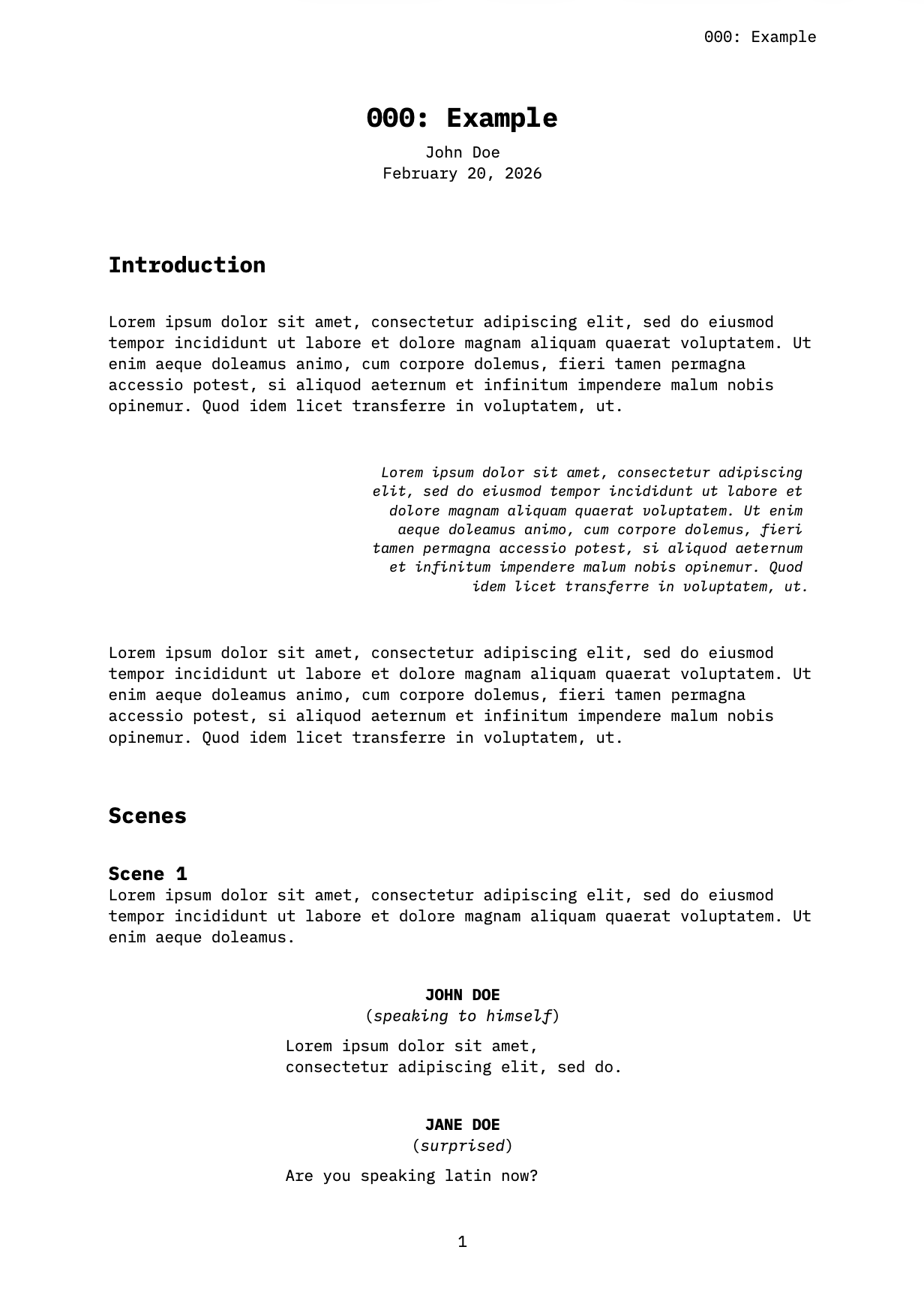
The template in itself is quite straightforward, it defines two blocks: one for the general layout of the document, such as the title, the fonts, and the disposition. The second recreate elements of a dialogue: name of the character, mood, and the lines. I don’t plan to be a screenwriter anytime soon, but the requirements for such documents were easy enough to not take too much time doing it. Perhaps I’ll tackle more interesting template challenges in the future. A cooking recipe one would be very nice: if I could transform a list of ingredients and steps into a nice document, I’ll be more than happy.